iRobot Roomba 105 Combo Review: Worth It? (October 2026)
The iRobot Roomba 105 Combo suits homes that want scheduled vacuuming and routine mopping with carpet avoidance. Its AutoEmpty dock, LiDAR mapping and three cleaning modes help with floor care, though you still manage the water and mop pad.
On this page (6 sections)
- What does the iRobot Roomba 105 Combo do well?
- How well does the Roomba 105 Combo handle mopping?
- How does the Roomba 105 Combo compare with alternatives?
- Is the Roomba 105 Combo a good choice for carpet and pet hair?
- What should you check before choosing a Roomba combo?
- Who should choose the iRobot Roomba 105 Combo?
The iRobot Roomba 105 Combo is a robot vacuum and mop for homes with mixed hard floors and rugs. It maps with LiDAR, offers vacuum-only, mop-only and combo modes, and is designed to avoid carpet while mopping.
The AutoEmpty dock collects debris in a bag designed to hold up to 75 days of dirt. You still need to manage the water and reusable microfiber pad, so the dock reduces debris-bin work but does not make mopping fully hands-free.
What does the iRobot Roomba 105 Combo do well?
The Roomba 105 Combo combines selectable floor care with carpet avoidance. It can vacuum, mop or run both functions together, and it maps rooms to support targeted cleaning and schedules.
iRobot Roomba 105 Combo Robot Vacuum: Best for carpet-aware combo cleaning
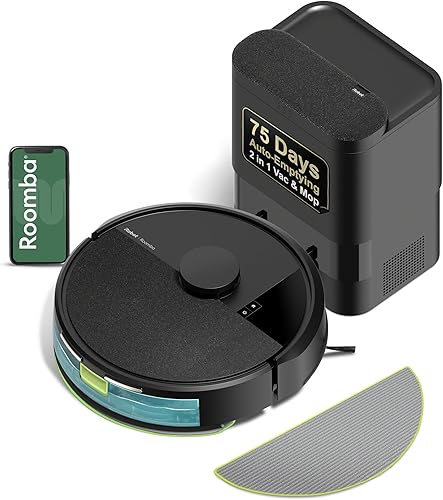
- Vacuum, mop or combo modes
- ClearView LiDAR mapping
- AutoEmpty dock holds up to 75 days of debris
- Automatically avoids carpet while mopping
A flexible combo robot for homes with rugs and hard floors. It offers carpet avoidance during mopping, room scheduling and a dock that collects debris in a replaceable bag.
Pros
- Three cleaning modes
- Automatically avoids carpet while mopping
- Room scheduling and keep-out zones in the app
- AutoEmpty dock holds up to 75 days of debris
Cons
- You still handle the mop pad and water
- The 2.4 GHz Wi-Fi requirement may need a network check
ClearView LiDAR maps the home for coverage, while specialized sensors help prevent falls down stairs. The Roomba Home app lets you set keep-out zones, select rooms and adjust cleaning passes, suction and the amount of liquid pumped onto the pad.
Its microfiber mop pad is reusable, and a micro-pump controls water flow to keep the pad uniformly moist during a run. SmartScrub is an optional setting for deeper scrubbing, which iRobot describes as 2x deeper than standard mop mode.
Is the AutoEmpty dock useful?
The dock reduces how often you need to empty the robot's debris, with a bag designed to hold up to 75 days. iRobot says the bag traps 99% of allergens as small as 0.7 microns, and you remove the used bag and replace it with a new one.
That claim concerns the dock bag. The robot does not wash or dry its mop pad, so you still need to manage the pad and water.
What should you know about Wi-Fi and controls?
The Roomba 105 Combo uses 2.4 GHz Wi-Fi for setup and operation. After setup, your phone can return to 5 GHz, while the robot remains on 2.4 GHz.
You can control it through the app, its buttons or compatible voice assistant devices. Check your router settings before setup if your home network is configured for 5 GHz only.
How well does the Roomba 105 Combo handle mopping?
The Roomba 105 Combo is suited to routine mopping on hard floors, with a microfiber pad and adjustable solution flow. SmartScrub provides a deeper-scrub mode, but this robot uses a pad rather than a self-washing roller system.
Set expectations around dried-on stains and sticky spills. Its mopping features support routine floor care, but stubborn messes may need extra cleaning.
The carpet-avoidance feature is useful for homes with rugs in mapped rooms. It is designed to detect and avoid carpet while mopping, reducing the need to build a separate keep-out plan for each rug.
If mopping is your main priority, compare more options in our guide to the Best Robot Vacuum For Mopping. For similar Roomba models, see our overview of best iRobot Roomba with mop.
How does the Roomba 105 Combo compare with alternatives?
The Roomba 105 Combo stands out for carpet avoidance during mopping and a debris-emptying dock. For another robot mop with an all-in-one dock, read our Dreame L40 Ultra review.
The alternatives below add different features, including a stated suction figure or a dock that washes and dries the mop. For another robot brand to compare, see the best Eureka robot vacuums.
| Model | Main distinction | Consider it if |
|---|---|---|
| iRobot Roomba 105 Combo | Carpet avoidance while mopping; AutoEmpty dock | You want combo cleaning with fewer manual debris-bin empties |
| iRobot Roomba Max 775 Pet | AutoWash dock, heated mopping and AI obstacle avoidance | You want more automated mop care and pet-focused features |
| roborock Q7 L5 | Stated 8,000 Pa suction; 270 ml tank | You want a stated suction figure and multiple saved floor maps |
The best Dreame robot vacuum and mop and best Eufy robot vacuum mop guides can help you compare other brands and cleaning setups.
What does the Roomba Max 775 Pet add?
The Roomba Max 775 Pet has a multifunction dock that empties debris, washes the mop, dries it and dispenses solution. Its mop cover lifts to shield carpets, and the robot includes heated spot mopping and AI obstacle avoidance.
The dock washes the mop at 167°F and dries it at 122°F. Its dual rubber brushes resist tangles from pet and long hair, and the app supports pet zone cleaning.
What does the roborock Q7 L5 add?
The roborock Q7 L5 offers 8,000 Pa of stated suction, 360° LiDAR mapping, multiple saved floor maps and a 270 ml water tank. It vacuums and mops in one run, with three water levels and a removable mop pad.
Its water tank and dustbin are designed as one integrated combo part. That layout is worth considering if you want to understand how water handling and debris collection fit together before choosing a robot.
For another model review, see the Eufy Omni E25 robot vacuum.
Is the Roomba 105 Combo a good choice for carpet and pet hair?
The Roomba 105 Combo can suit a home with hard floors and rugs, because it is designed to avoid carpets while mopping. Compare it with Shark robot vacuum and mop combos if you are considering another combo.
Its product information includes a multi-surface brush and suction claims, but it does not give a carpet-specific performance measure.
If carpet pickup is your main concern, compare it with our guide to the Best Roomba Vacuum For Carpet. Check how much carpet you have, whether rugs have fringe and how often you want to run the vacuum.
The Roomba Max 775 Pet is a more pet-focused option in this comparison. Its dual rubber brushes are designed to resist tangles from pet and long hair, and its app supports pet zone cleaning.
What should you check before choosing a Roomba combo?
Check floor mix, mop upkeep, network compatibility and dock placement before buying. These details affect how a robot fits your routine after setup.
- Floor mix: The 105 Combo is designed to avoid carpet during mopping, but you should still clear loose cords and objects from its path.
- Mop care: The reusable microfiber pad and water system need attention between runs. The AutoEmpty dock handles debris, not mop washing.
- Network: The robot needs 2.4 GHz Wi-Fi for setup and operation.
- Space: The robot measures 13.35 x 13.19 x 4.09 in. Check that it can pass under furniture and that the dock has a suitable place.
- Routine: Use room scheduling and keep-out zones if you want to target specific areas or avoid cluttered spots.
For more context on Roomba models and buying decisions, read How Much Does a Roomba Cost?.
Who should choose the iRobot Roomba 105 Combo?
Choose the Roomba 105 Combo if you want one robot for scheduled vacuuming and routine mopping, have rugs that benefit from carpet avoidance, and prefer a dock that collects debris. Its app controls, LiDAR mapping and three cleaning modes make it adaptable to different rooms.
Choose the Roomba Max 775 Pet if a dock that washes and dries its mop and features aimed at pet messes matter most. Pick the roborock Q7 L5 if its stated suction figure and multiple saved floor maps better match your needs.
The Roomba 105 Combo suits a household comfortable with basic mop upkeep in exchange for less frequent debris-bin emptying. Check your 2.4 GHz Wi-Fi and available dock space as part of the decision.
Frequently asked questions
Does the Roomba 105 Combo avoid carpet while mopping?
Yes. The Roomba 105 Combo is designed to detect and avoid carpet while it mops, so rugs can stay dry without you programming carpet areas first.
If you have thick rugs, loose fringe or unusual floor transitions, clear those areas and check the robot's route during early runs.
Can the Roomba 105 Combo vacuum without mopping?
Yes. You can choose vacuum-only, mop-only or combined vacuum-and-mop cleaning.
The app also lets you schedule rooms, set cleaning passes, adjust suction and control how much solution reaches the microfiber pad, so you can match the run to the floor and task.
How often does the Roomba 105 Combo dock need emptying?
The AutoEmpty dock is designed to hold up to 75 days of debris in its bag, but actual timing depends on how much dirt the robot collects. Replace the bag when it fills, and remember that the dock empties debris, while you still need to manage the water and mop pad.
Does the Roomba 105 Combo work on 5 GHz Wi-Fi?
Setup and operation use a 2.4 GHz network. After setup, your phone can return to 5 GHz, while the robot stays on 2.4 GHz for operation.
Check that your router can provide that band before setup if your home network uses 5 GHz.