How to Use a Levoit Core 300 Air Purifier
To use a Levoit Core 300 air purifier, remove the filter packaging, place the unit on a level surface with open airflow, plug it in, and choose a fan setting. Use Sleep Mode at night, higher fan speeds when particles or odors increase, and check the filter indicator regularly.
On this page (11 sections)
- How do you set up a Levoit Core 300 air purifier?
- Where should you place the purifier?
- Which Levoit Core 300 setting should you use?
- How does the Core 300 filter work?
- How do you care for the filter?
- Which product helps with this setup?
- When would a larger Levoit purifier make sense?
- Is a smaller Levoit purifier enough for one room?
- How do you use a Levoit Core 300 around pets?
- What should you do if the purifier seems weak?
- How should you use a Levoit Core 300 every day?
To use a Levoit Core 300 air purifier, install the unwrapped filter, place the unit where air can circulate, plug it in, and choose the fan speed that matches the room. Use Sleep Mode for quieter nighttime operation and maintain the filter when the indicator or visible buildup calls for attention.
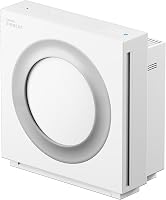
The Core 300-P has a 3-in-1 filtration system with a pre-filter, main filter, and activated carbon filter. It uses touch controls, has a 24 dB Sleep Mode, and is designed for rooms up to 1,073 ft² once per hour.
For a wider explanation of what these machines do, see our guide to what is an air purifier for home.
How do you set up a Levoit Core 300 air purifier?
First, remove all packaging from the filter before turning on the purifier. A wrapped filter cannot clean air correctly and can restrict airflow.
Set the purifier upright on a firm, level surface. Keep the intake and outlet clear of walls, curtains, furniture, bedding, and other objects that could limit air movement.
Connect the power cord to a suitable outlet, then use the touch control to start the unit. The Core 300-P is a 120V appliance intended for use in the United States.
Before regular use, check the air path around the purifier. It should stand securely without rocking, and the cord should stay away from pets that might chew it.
If you are comparing models before setup, our guide to the best Levoit air purifier options can help you match room size and controls to your routine.
Where should you place the purifier?
Put the purifier in the room where you want cleaner air, with open space around its air openings. Good locations include a bedroom, office, or living area where the unit can run without being covered or boxed in.
Avoid placing it behind a sofa, under a desk with blocked sides, or directly beside curtains. These locations can make it harder for air to enter and leave the machine.
Keep the unit on a dry, stable surface. Do not place objects on top of it or use it where spills could reach the controls or electrical parts.
For a bedroom, position the purifier where it can run without blowing directly into bedding or being knocked over during the night. Leave enough room to reach the touch controls and filter access area.
Which Levoit Core 300 setting should you use?
Choose the fan speed based on the room's current air conditions and how much noise you can accept. Use a higher speed after cooking, during dusty activities, or when pet hair and odors are more noticeable.
Use a lower speed for normal background operation. The Core 300-P does not include Auto Mode, so you select the fan speed manually rather than letting the purifier change it automatically.
How to use a Levoit Core 300 air purifier at night
Select Sleep Mode when you want quieter operation and a darker display. The Core 300-P's Sleep Mode operates at 24 dB, and its display lights can be turned off.
Run the purifier before bedtime if the room needs more air movement, then switch to Sleep Mode when you settle in. Keep the air openings clear even when the room is dark.
Sleep Mode is useful for bedrooms because it reduces interruptions, but it also uses the lowest fan setting. If the room has a strong odor or visible dust, use a higher setting first.
Should you use the timer?
The Core 300-P includes timer choices for 2, 4, 6, or 8 hours. A timer suits short cleaning periods when you want the purifier to stop after a set time.
For ongoing air circulation, leave the unit running at a suitable fan speed instead of using a timer. Follow the manual if you need instructions for changing or canceling a timer.
How does the Core 300 filter work?
The filter uses 3 stages to handle different types of airborne material. The pre-filter captures dust, lint, fibers, hair, and pet fur, while the main filter captures fine particles such as pollen, dust, and pet dander.
The activated carbon filter helps reduce smoke and odors. Levoit describes the main filtration as 99.97% efficient for 0.1 to 0.3 μm airborne particles, based on independent lab testing.
These stages work together, but an air purifier does not replace source control. Remove dust at its source, ventilate when appropriate, and follow safe practices for smoke, fumes, and household chemicals.
How do you care for the filter?
Inspect the pre-filter regularly and replace the filter when the indicator or condition requires it. Dust, hair, and lint on the outer filter surface can reduce airflow if they build up.
Turn the purifier off before cleaning or handling the filter. Follow the user manual for the approved cleaning method, and do not use a wet filter unless the instructions specifically allow it.
Levoit recommends replacing the Core 300-P filter every 6 to 8 months. Heavy dust, smoke, pets, or frequent use may make the filter need attention sooner.
The best Levoit Core 300S replacement filter guide can help when you are planning the next filter change. Check the exact model before ordering because filters are not automatically interchangeable across every Levoit purifier.
Which product helps with this setup?
The standard Core 300-P suits readers who want manual touch controls, a 3-stage filter, Sleep Mode, and a compact purifier for bedroom or office use. Check Levoit air purifiers on sale if you are comparing current offers.
The model includes 1 pre-installed 3-stage Original Filter, 1 air purifier, a Quick Start Guide, and a User Manual. Its listed dimensions are 8.7 x 8.7 x 14.2 in, and it weighs 7.9 lb.
Choose this model when you want simple controls and do not need smart connectivity or Auto Mode. The Core 300-P requires manual fan speed control.
When would a larger Levoit purifier make sense?
Choose a larger model when the room needs broader coverage or you want automatic air-quality response. The LEVOIT Smart Air Purifiers for Home Large is the Core 400S-P, with coverage up to 1,718 ft² once per hour.
It has a pre-filter, main filter, and activated carbon filter. Its AirSight Plus sensor detects PM2.5 levels and displays readings in real time, while Auto Mode adjusts fan speed based on air quality.
The Core 400S-P can connect to the VeSync app for settings, schedules, timers, and filter-life monitoring. It also works with Amazon Alexa and Google Assistant, and Sleep Mode can run as low as 24 dB.
Its listed dimensions are 10.79 x 10.79 x 20.43 in, and it weighs 12.79 lb. That larger size may suit an open room, but measure your floor space before choosing it.
Is a smaller Levoit purifier enough for one room?
A small purifier can suit a bedroom, office, dorm room, or kitchen when you want a compact unit for a personal space. The Levoit Air Purifiers for Bedroom Home Pets is the Core Mini-P, with a 7W power rating and dimensions of 6.5 x 6.5 x 10.4 in.
It has a pre-filter and main filter for lint, hair, pet dander, fine airborne pollutants, and smoke particles. It also includes Sleep Mode, an auto-off display, and an aromatherapy feature.
The Core Mini-P weighs 2.2 lb and uses an adapter stored inside the purifier. If you use its aromatherapy feature, the product information says to use only 2–3 drops of essential oil.
Choose the Core Mini-P when portability and a smaller footprint matter more than the Core 300-P's larger filtration setup. Our Levoit Core Mini air purifier review covers that smaller option in more detail.
How do you use a Levoit Core 300 around pets?
Keep the purifier's power cord away from pets and inspect the pre-filter for hair and fur. Pet hair can collect on the outer filter surface, so regular inspection helps you notice restricted airflow.
Place the purifier where pets cannot knock it over or chew the cord. Avoid hiding it behind a pet bed, curtain, or furniture where the intake may be blocked.
The Core 300-P's pre-filter is designed to capture hair and pet fur before air reaches the main filter. It still works best alongside regular vacuuming and source cleaning.
For a different room size and automatic controls, compare the Levoit Core 400S review.
What should you do if the purifier seems weak?
Check the filter packaging, airflow openings, fan setting, and filter condition first. A wrapped filter, blocked intake, low fan speed, or dusty pre-filter can all reduce the amount of air moving through the unit.
Turn the purifier off before checking the filter. Make sure the unit is upright and that curtains, furniture, and bedding are not covering the air openings.
If the filter indicator is on, follow the manual's replacement instructions. Use a filter designed for the exact purifier model, and stop using the unit if the cord or plug is damaged.
For another type of automatic home cleaning appliance, see Best Robot Vacuum or Best Shark Vacuum if floor cleaning is also part of your routine.
How should you use a Levoit Core 300 every day?
Run the purifier in the room you use, select a higher fan speed when particles or odors increase, and switch to Sleep Mode when quiet nighttime operation matters. Keep the airflow open and inspect the filter regularly.
Pick the Core 300-P if you want manual touch control and a 3-stage filter in a bedroom, office, or other room. Pick the Core 400S-P if you need larger-room coverage, Auto Mode, app scheduling, and real-time PM2.5 readings.
Pick the Core Mini-P if you need a smaller 7W purifier for a bedroom, dorm room, office, or kitchen. For more guidance on how to use a Levoit Core 300 air purifier, match the fan setting and filter routine to your room's dust, pet hair, odor, and noise needs.
Frequently asked questions
How do I set up a Levoit Core 300 air purifier?
Remove the filter from its packaging, install it as shown in the manual, place the purifier on a level surface with clear space around the air openings, and connect it to a suitable outlet. Turn it on, select a fan speed, and check that air can move freely around the unit.
Which setting should I use on a Levoit Core 300?
Use a higher fan speed when the room has more dust, smoke, odors, or pet hair. Use Sleep Mode during quiet periods or overnight because it runs at a lower speed and can turn off the display lights; the Core 300-P requires manual fan control rather than Auto Mode.
Where should I place a Levoit Core 300 air purifier?
Place it on a stable, level surface where the intake and outlet are not blocked by walls, furniture, curtains, or bedding. A bedroom, office, or living area can work, but keep the purifier in the room where you want air circulation instead of hiding it behind furniture.
How often should I replace a Levoit Core 300 filter?
Levoit recommends replacing the Core 300-P filter every 6 to 8 months, although the timing depends on use and indoor conditions. Check the filter indicator and inspect the pre-filter for dust, hair, and lint so you can maintain airflow between replacements.