Can You Use a Robot Vacuum without an App?
On this page (6 sections)
Yes, you can often use a robot vacuum without an app, especially simpler models. Many robot vacuums can start cleaning with a simple button press on the device itself. This makes them very accessible for basic cleaning tasks. You won’t always need your phone.
For many robot vacuums, the app offers extra features like scheduling and zone cleaning. But the core function of vacuuming is usually available right out of the box. You can still get a clean floor even if you’re not tech-savvy or prefer not to use an app. It’s a great option for many households.
- Most robot vacuums can clean without their app.
- Look for a physical “clean” button on the vacuum itself.
- Apps offer advanced features like scheduling and mapping.
- Basic models are designed for simple, button-press operation.
- You can still get a clean home without using a smartphone.
Let’s break down how you can get your robot vacuum working, even if you’d rather skip the app setup. We’ll cover the common ways to start cleaning.
So, you’ve got a shiny new robot vacuum, but the idea of downloading another app, creating an account, and figuring out Wi-Fi connections feels like too much hassle? You’re not alone! Many people want the convenience of automated cleaning without the tech headache. The good news is, you can often get your robot vacuum cleaning your floors without ever touching your smartphone.
Operating Your Robot Vacuum Without a Smartphone App
Most robot vacuums are designed with basic operation in mind. You can typically start them up with a simple press of a button right on the unit itself. Think of it like turning on a regular vacuum cleaner. This core functionality is usually built-in, ensuring you can get cleaning done even if you’re not a tech whiz.
The Magic Button: Starting Your Robot’s Cleaning Cycle
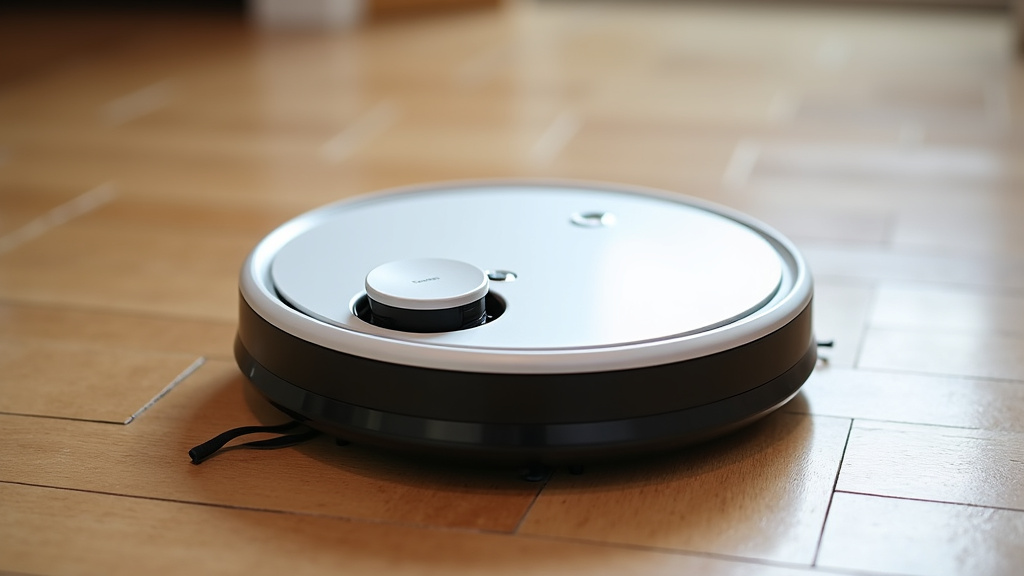
The most common way to run your robot vacuum without an app is by locating the physical start button. You’ll usually find this prominently displayed on the top of the robot. It’s often labeled with a power symbol, a play button, or simply says “Clean” or “Start.”
Once you press this button, the robot will typically initiate a standard cleaning cycle. This means it will begin moving around your home, trying to cover as much floor space as possible. For many users, this is all they need for everyday tidying.
What to Expect from Button-Press Cleaning
When you use the button-press method, your robot vacuum will likely follow its default cleaning pattern. This is often a randomized or systematic path designed to cover a room. It won’t usually be able to perform specialized cleaning like spot cleaning or edge cleaning unless that’s its programmed default. The main goal is simply to get those floors clean.
Understanding Your Robot’s Basic Functionality
Think of the physical button as the “get started” switch. It’s the most direct way to tell your robot, “It’s cleaning time!” No setup, no Wi-Fi passwords, just pure, unadulterated vacuuming power. This is especially true for older models or simpler robot vacuum designs.
Even some of the more advanced models, while heavily promoting their app features, still include this essential button. It’s a thoughtful design choice that makes them accessible to a wider range of users. The core cleaning capability is always there, ready when you are.
Returning to the Dock: A Simple Process
After the cleaning cycle is complete, or if the battery starts to run low, your robot vacuum will usually attempt to return to its charging dock. This is often an automatic function. You might need to press the “Home” or “Dock” button if it’s available, or simply let the robot figure it out on its own.
Some robots will automatically return to their dock once they’ve finished cleaning. Others might require you to press a dedicated “Dock” button, which is also usually located on the unit. If neither is present, sometimes returning the robot manually to its dock will allow it to charge. It’s always worth a quick check of your robot’s manual.
When the App Enhances, But Isn’t Required
It’s important to understand that while you can use your robot vacuum without an app, the app often unlocks a lot of extra convenience and customization. Think of the app as the robot’s super-enhancement tool. It’s not always necessary for the job, but it makes the job much easier and more efficient.
Features You Might Miss Without the App
Without the app, you’ll typically miss out on features like:
- Scheduling: You can’t set specific times or days for the robot to clean.
- Mapping: The robot won’t save maps of your home, so it can’t do targeted room cleaning.
- Virtual Walls/No-Go Zones: You can’t tell the robot to avoid certain areas electronically.
- Cleaning Modes: You might be limited to the default cleaning mode and can’t switch to spot cleaning or edge cleaning.
- Status Updates: You won’t get notifications about cleaning progress or error messages on your phone.
The Trade-Off: Simplicity vs. Control
Choosing to skip the app means you’re opting for simplicity. You press a button, it cleans. You might have to do a little manual prep work, like picking up small items from the floor. This is a fair trade-off for many who just want basic floor maintenance.
On the other hand, if you want your robot to clean specific rooms while you’re out, or avoid an area with delicate furniture, you’ll likely need the app. The app provides the granular control that makes advanced robot vacuums so powerful. For example, some advanced robots can clean only your kitchen after dinner, all thanks to app-based zone control.
Exploring Your Robot’s Physical Buttons and Controls
Before you dismiss the app entirely, take a moment to examine your robot vacuum. Many models have more than just a single “Clean” button. You might find buttons for:
- Home/Dock: To send the robot back to its charging station.
- Spot Clean: To initiate a deep clean in a small, concentrated area.
- Pause/Resume: To temporarily stop and then restart a cleaning cycle.
Familiarizing yourself with these buttons can greatly improve your experience, even without app connectivity. It gives you a little more flexibility and command over the robot’s immediate actions.
When Is an App Absolutely Necessary?
There are certain situations and types of robot vacuums where an app might become almost essential. If you’ve purchased a high-end, feature-rich robot, it’s likely built around its smart capabilities.
Smart Mapping and Navigation Features
Robots with advanced mapping technology, like LiDAR or vSLAM, rely heavily on their apps. These robots create detailed maps of your home. The app allows you to view these maps, name rooms, and set custom cleaning zones or no-go areas. Without the app, you can’t tell the robot to clean just the living room or to avoid the pet’s water bowl.
For these models, using the physical buttons might only trigger a basic, un-mapped cleaning pattern. It’s like buying a sports car and only ever driving it in first gear. You’re not utilizing its full potential, and some key features will simply be inaccessible.
Wi-Fi Dependent Models and Setup
Some robot vacuums are designed from the ground up to be Wi-Fi connected. Their initial setup process might require app interaction to connect to your home network. If you’re unable to connect to Wi-Fi or don’t want to, you may find these specific models difficult or impossible to use at all.
Always check the product description and manual for any robot vacuum you consider. It will usually specify if app connectivity is a requirement for basic operation. If it says “Wi-Fi required for setup,” and you’re app-averse, it’s best to look for a different model.
A Quick Checklist for App-Free Robot Vacuuming
Here’s a simple way to check if your robot vacuum can work without an app:
- Locate the Physical Buttons: Can you find a “Clean,” “Start,” or “Power” button directly on the unit?
- Read Your Manual: Does the manual mention basic operation via buttons?
- Test the Button: Press the main button and see if it starts cleaning.
- Observe Auto-Return: Does the robot try to go back to its dock when finished or low on battery?
- Understand Limitations: Are you okay with basic cleaning without advanced features like scheduling?
- Check Product Specs: If buying new, look for models that explicitly state button-operation is possible.
Conclusion
So, you’ve learned that using a robot vacuum without its app is totally doable for many models. The key is usually a simple physical button on the unit itself for basic cleaning. While apps offer cool extras like scheduling and mapping, they aren’t always essential for getting your floors clean. If you prefer a no-fuss approach, look for models with straightforward button controls. Before you buy, quickly check the product specs or manual to confirm button-operation is supported. You can absolutely enjoy automated cleaning without the tech setup if that’s your preference.
Frequently Asked Questions
Can I use a robot vacuum if I don’t have Wi-Fi?
Yes, many robot vacuums work perfectly fine without Wi-Fi. Most models have a manual start button on the unit that allows you to initiate a cleaning cycle. You’ll miss out on app-controlled features, but the basic vacuuming function will still work.
What happens if my robot vacuum doesn’t have a “Home” button?
If your robot vacuum doesn’t have a dedicated “Home” or “Dock” button, it will likely still attempt to return to its charging base automatically when the cleaning cycle is complete or the battery is low. You might need to manually place it back on the charger in some cases.
Will a robot vacuum clean the same without the app?
Generally, no. When used without an app, your robot vacuum will likely perform a basic, un-programmed cleaning pattern. Features like zone cleaning, scheduled cleanings, or specific room targeting are usually app-dependent.
Are there any robot vacuums that *require* an app?
Yes, some advanced or newer models are designed to be heavily reliant on their app for setup and basic operation. These often use smart mapping or require Wi-Fi connectivity to function at all. Always check the product manual or description to see if an app is mandatory.
How do I know if my robot vacuum has a physical start button?
Most robot vacuums will have a clearly visible button on the top of the unit. Look for a power symbol, a play button, or text that says “Clean” or “Start.” Your robot’s manual will also confirm the location and function of all physical buttons.